Resizing your images and how to use Fast Stone.
|
|
Right Lets Open Up The Program Fast Stone Image Viewer
|

FastStone
Shortcut icon
|
You can close down your ‘My Documents’ Folder now…
it has done its job .. we have our five pics stored in the original-pics folder …… right ?????
Okay if you have downloaded correctly the Faststone Image viewer program then you will see
<—-
<—-
this shortcut icon on your desktop – if you click it – it will open the program up. Try it.
If you can’t see the shortcut icon then you will have to go to the green start button at the bottom left corner of your screen – click on the start —>Programs —> then find FastStone Image Viewer – click on the icon and the program will open. |
|
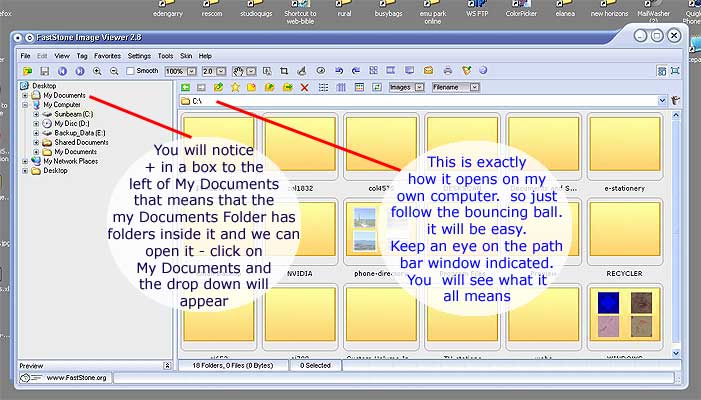 |
THINGS TO WATCH : Observe the Path indicator box… remember we are aiming
form
My Documents –> bag-pics-for-web –> bags-july-07 –>original-pics
in the left hand menu..
Desktop + My Documents. – watch what happens when we click on the My Documents… |
|
Go To Next Page
|
|
|
